MIE243
CNC MACHINE

One of the projects I took on as part of the MIE243 Mechanical Engineering Design course is to create a CNC Machine. At first, this group project may seem quite complicated. Where would you even start with something like this? However, after breaking down the problem, it becomes much easier to tackle such a large challenge. Take a look at how our group worked together to create a CNC Machine for a hobbyist machinist!


Defining the Project Specifications

The first thing that our team did was define the project specifications. We needed to define who our CNC machine was for, and what our CNC machine could do. How much did we want our project to cost? What materials did we want our machine to cut? There were several factors to consider for the project.
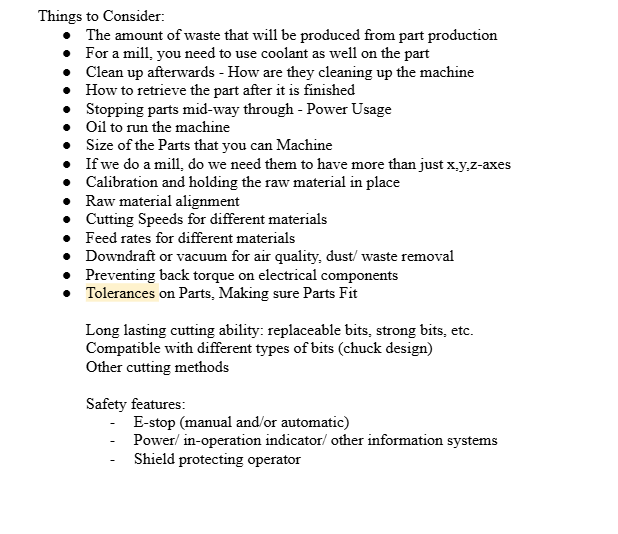
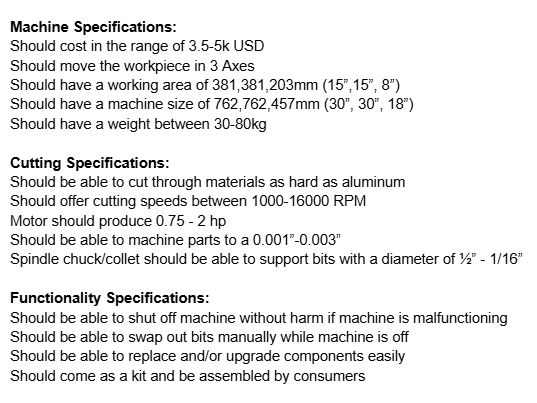
Some factors that we considered for the project. These factors are based off of the assignment details and our general research into how a CNC machine should work.
Some rough specifications that we set for the project. These specifications were set based on our market research. Our team looked at various CNC mills and routers on the market and then set a our specifications to be competitive in the market.
After doing market research, the team was able to progressively determine specifications through direct comparison. This graph represents the weight of various CNC machines on the market as a function of price. Our team made several graphs to compare how various companies fared in the marketplace. From there, we could set our metrics for the project as we wished.

Candidate Designs

After our team defined the project and did market research on existing CNC machines, our team then proceeded with creating candidate designs for a CNC machine. During our team meetings, we made sure to talk about which components we wanted to use so that our designs did not overlap with each other too much. Furthermore, we made sure to provide feedback to each other to ensure that our designs were feasible.

Our team broke the CNC Machine down into components using a morph chart, where each group member would create a design using the different components. At first, our team was comprised of 3 people: Amen, Harrison, and myself. However, we were eventually joined by our final group member, Rahima. This image is a morph chart that we used to come up with our initial candidate designs. Similarly shaded sections indicate that these options were bundled into the same Initial Candidate Design.
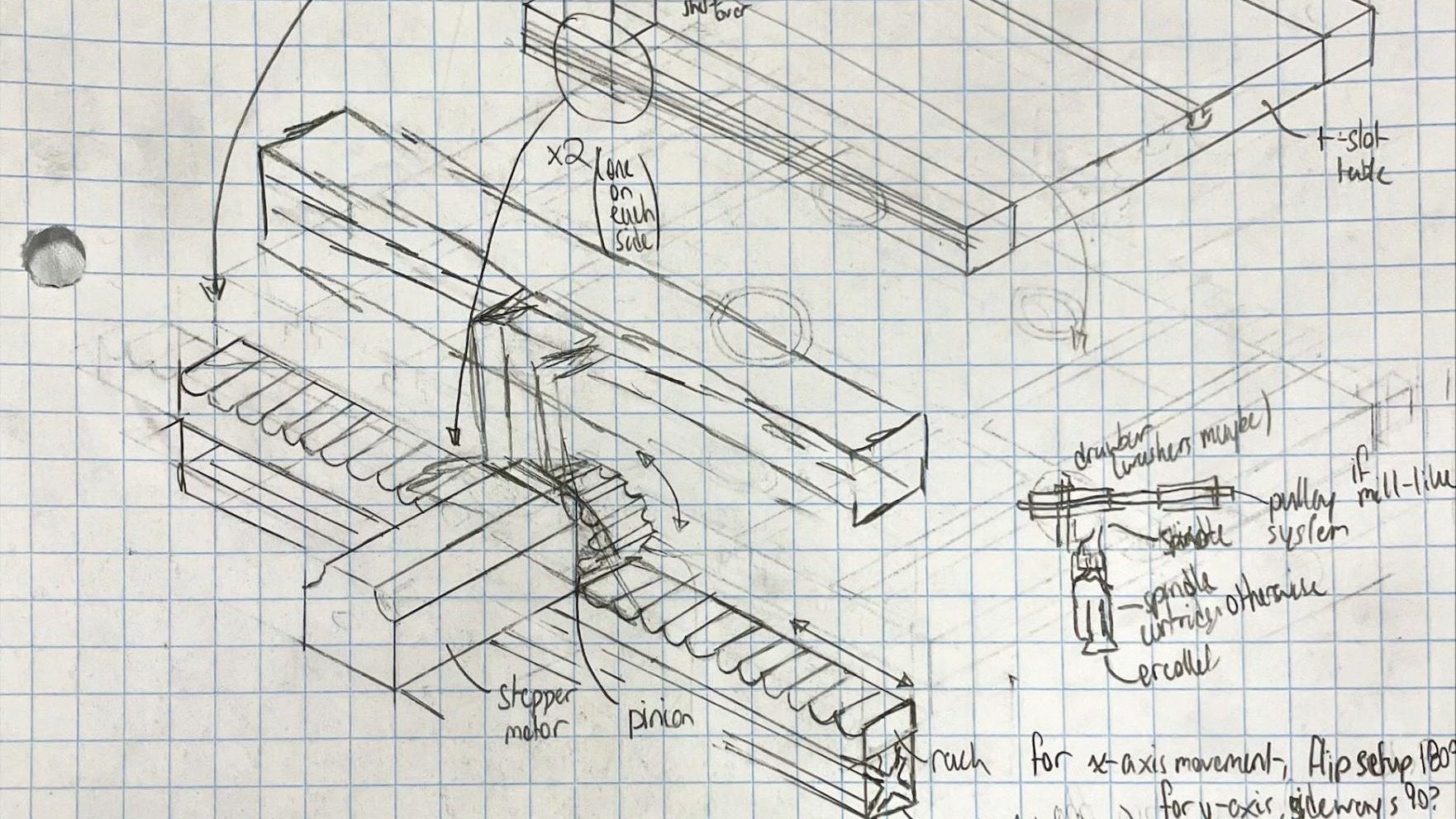
These are some rough sketches I made of components before creating my first candidate design. I had never done much drafting or detailed drawing in general prior to this course, so I wanted to quickly sketch some components for my candidate design before I going to actually draw the candidate design fully. Drawing out components also helped me understand how to draw the components more to scale, which helped me understand which areas needed to have more space and which areas would be hidden in the isometric view.
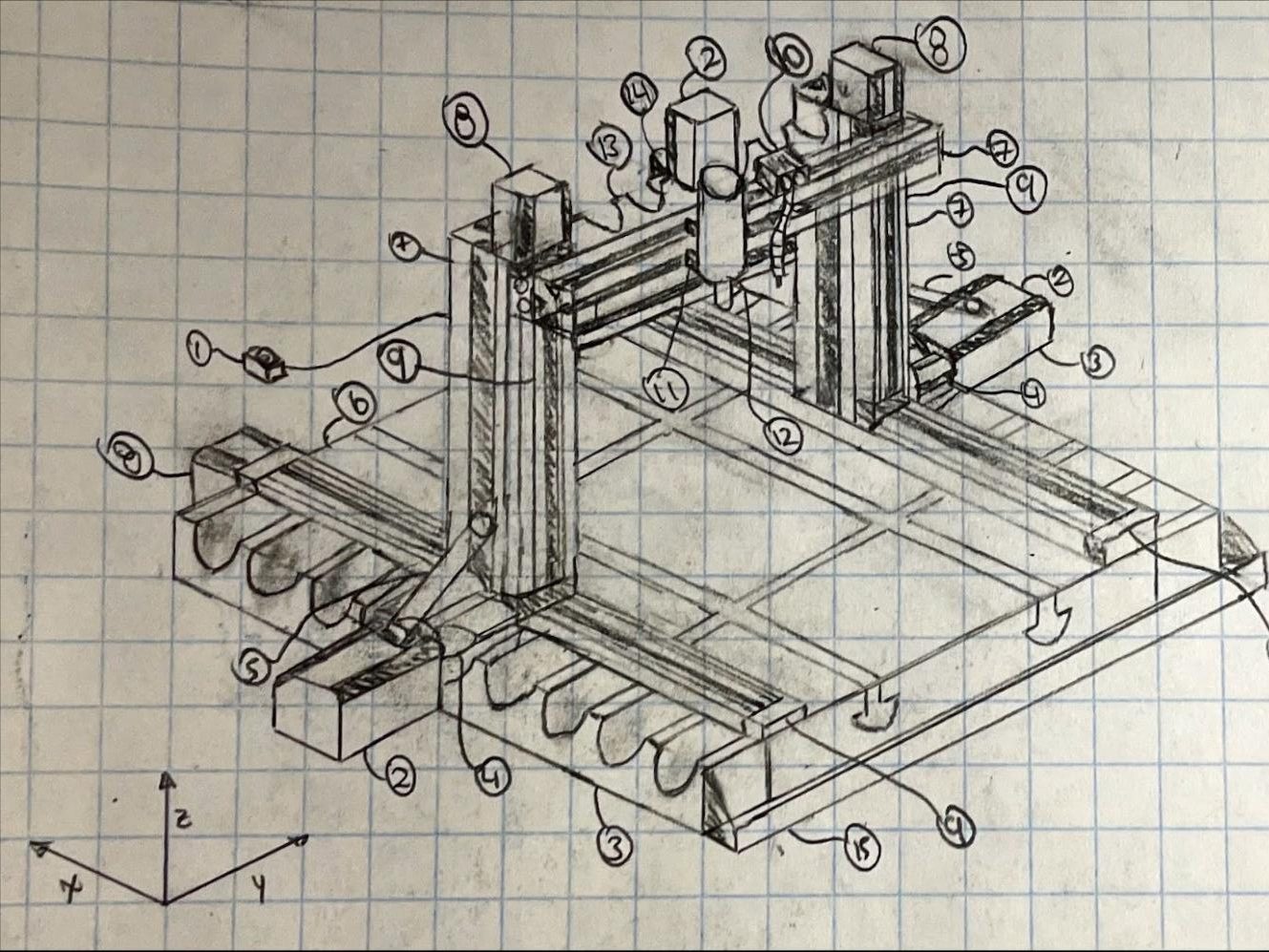
One of my candidate designs, based on the rough sketches I did. Drawing this properly as an isometric drawing took SO much time, but it was worth. The bubbles for the drawing correspond to various components of the design. This design uses a rack and pinion for the x and y-axes, and linear rails for the z-axis.
Pros and cons for our first 3 candidate designs. Giving feedback on everyone’s candidate design was good for improving the team atmosphere, as everyone was comfortable with giving and receiving advice.
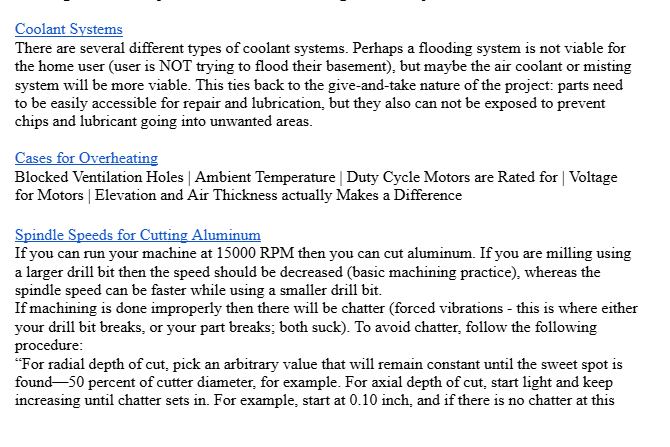
Some basic research on coolant for the project. My first candidate design did not include a coolant system, but after machining parts for UTAT Space Systems, I let the team know that coolant was a good idea. The additional research our team did was used to inform our second round of candidate designs.

Amen, Harrison, and I created the first 3 candidate designs. We brought these designs to our first check-in with our TA. After the check-in, the team further iterated on the candidate designs to create 4 more candidate designs, therefore leaving us with a total of 7 candidate designs. We also did a TON of research to make our final 4 candidate designs more detailed and better represent what our final (for this course) conceptual design would look like. The research we have done allows us to justify our design choices for our conceptual design.


CAD and our Conceptual Design

Once we had our candidate designs, our team then worked to determine our final conceptual design. During this process, our team tried to think about the various tradeoffs for using certain parts, and why we may want to use certain features over others. For example, our team decided to use ball screws for x and y-axis movement because there would be minimal backlash. We also decided to use stepper motors over other motor types to reduce backlash and improve accuracy in small movements. Our team then started creating our CAD model for the conceptual design using Solidworks.

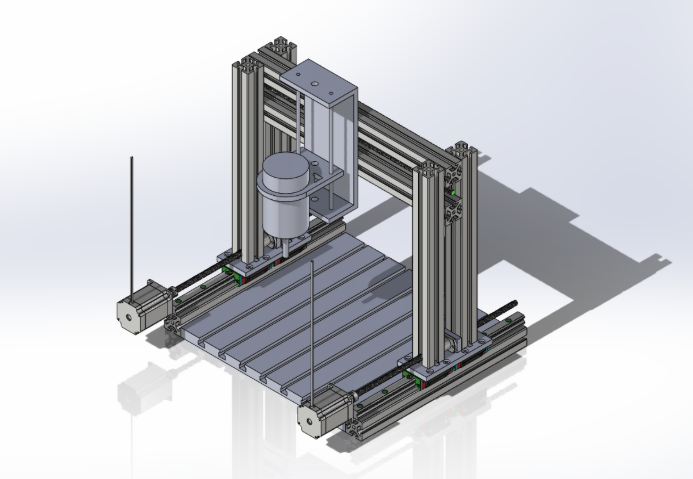
A rough CAD model of our conceptual design. This design is mainly made to check for spacing for the project. It is also missing several features, such as the coolant system, acrylic casing, and emergency stop. More importantly however, this design is missing the actual motors that need to be included in the design. The stepper motors would be implemented afterwards in our second iteration of the CAD model. Some things to improve on from this design include: making the design align with our planned conceptual design components and
A look into how our conceptual design is going to look. For a lot of the parts, we used the CAD models from McMaster-Carr but then found the identical part from another supplier at a lower cost. McMaster-Carr often had higher prices on their parts than other companies, but the CAD models on their website were the most professional models we could find. In this snapshot, you can see that the spindle area is still very much a work in progress. Furthermore, you can also notice that there are motor mounts missing for the x-axis movement, along with plates for between the threaded rods and the stepper motors. However, using parts that were actually to scale made understanding the scale of the design much easier. It also helped us understand what specifications were realistic and what specifications needed to be further iterated on.
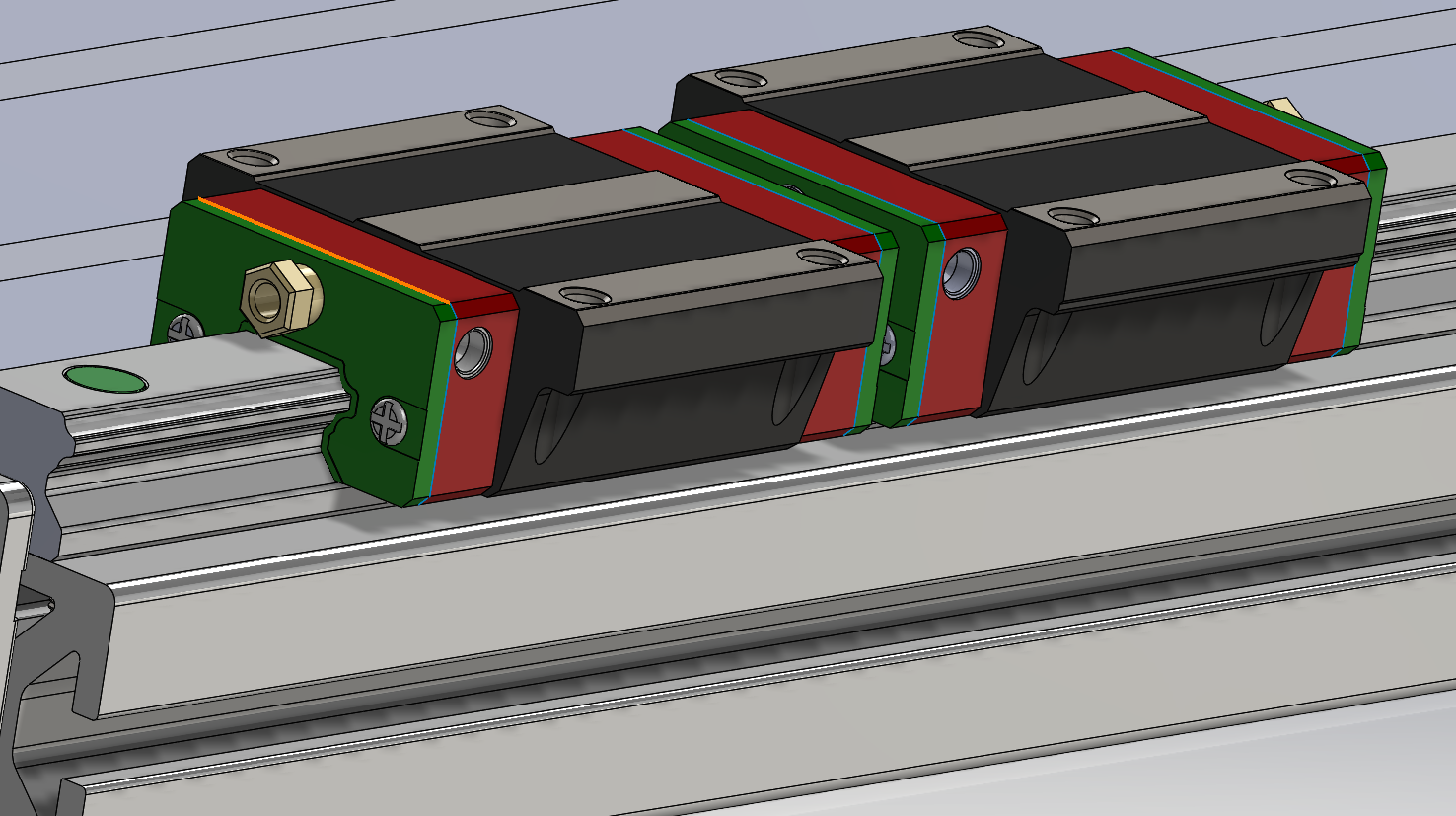
Linear bearings sitting on the square HGR20 Rails. Learning about naming conventions for different parts such as linear rails and motors was actually quite interesting. For example, how would I know that the 23 in a NEMA 23 Stepper motor refers to the frame size being 2.3 inches if I did not take the time to search motor specifications? For our design, we decided to use two linear bearings for the x-axis because we want to mount the rest of the gantry on top of the linear bearings using a custom mounting bracket.
Base mount shaft supports for the z-axis movement (CAD file sourced from McMaster-Carr). McMaster-Carr is wonderful for getting detailed CAD files for free online, as it would be extremely time-consuming to go and CAD parts like screws and fasteners without access to these libraries. For our conceptual design, we use four of these base mount shafts by using two for each of the z-axis movement supports. This reduces any unwanted rotation in the yz plane while the spindle is moving in the z-axis.

Analyzing my Teamwork Skills

During my APS111 and APS112 course, I used the ITP metrics system to analyse my teamwork, provide effective feedback for my peers, and receive constructive criticism to make myself a better teammate. In the past, the general consensus I have found with my feedback is that I am an alright teammate to be around in terms of having fun, but when it comes down to focusing on doing work, I am not as focused. Therefore, for this course, I wanted to make sure that I am not only did I have a lot of fun with my team, but I also wanted to make sure that our team also got as much work done as possible.
Our team has this inside joke that every day is Amen’s birthday. Now, you may as, why would you do this? And my response would be, why not? Would you treat somebody poorly if you knew it was their birthday? Of course not. So why not treat everyone like it is their birthday everyday? Happy birthday Amen, party hard!

During this project, I feel like I have somewhat taken a bit of a leadership position. This is not really what I had in mind when I started the project. However, when forming groups, Harrison was away at an event. This led to me meeting Amen. Additionally, when we were looking for a fourth member to join our team, I somehow ended up contacting Rahima. I guess that in some way, I have acted as an intermediary in terms of communication, and if that makes me some form of leader, then I am fine to take that role. However, I would prefer to tell people that I just make sure everyone is on the same page.

These are my ITP metrics responses for MIE243. The yellow is my personal rating, and the blue is the team’s rating. When I did my personal assessment, one did not feel like I was contributing too much to the team. Perhaps I was underselling myself, and doubting my abilities, because my team rated me quite highly in capabilities and standards. I think that one thing I really need to improve on however, is organization. I often find myself trying to remember all the tasks that need to be completed instead of using an organizational software. However, delegating a couple tasks and keeping a spreadsheet for what needs to be done would make the workflow for the project much smoother. If I am being honest, I think that my teammates are being way too kind; I definitely have not been this good as a teammate, but if they believe in my abilities this much then I am going to do as much as I can to contribute to making our project a success.

Ultimately, I hope that I am continuing to grow as a person throughout these group projects. One thing I try to do whenever I am working with the team is we will go and play Connections, just as a way of working together to achieve a common goal. You can call me a bit biased, but I personally think that we are getting pretty good at Connections. In all seriousness, I hope that by trying to stay positive, even in the hardest of times, I can encourage my team to put their best foot forward and make this project a success. And when I see my teammates working so hard to complete their tasks, it only makes me want to work harder to help make their work stand out! Hopefully, our hard work will come together and this project will be a success!


The Final CAD Model

To create the final CAD Model, our team split up the CNC Machine into several subassemblies. This served two purposes. First of all, this made the workload easier as each team member could work on a specific subassembly and find parts for their subassembly, which meant that we would make more progress on the CAD model at the same time. More importantly however, this ensured that Solidworks was less likely to crash as there was less stress on each person’s computer at a given time. Each subassembly contained several components; some were custom, made by the team, while others are off-the-shelf parts. These subassemblies come together to create our final CAD model.
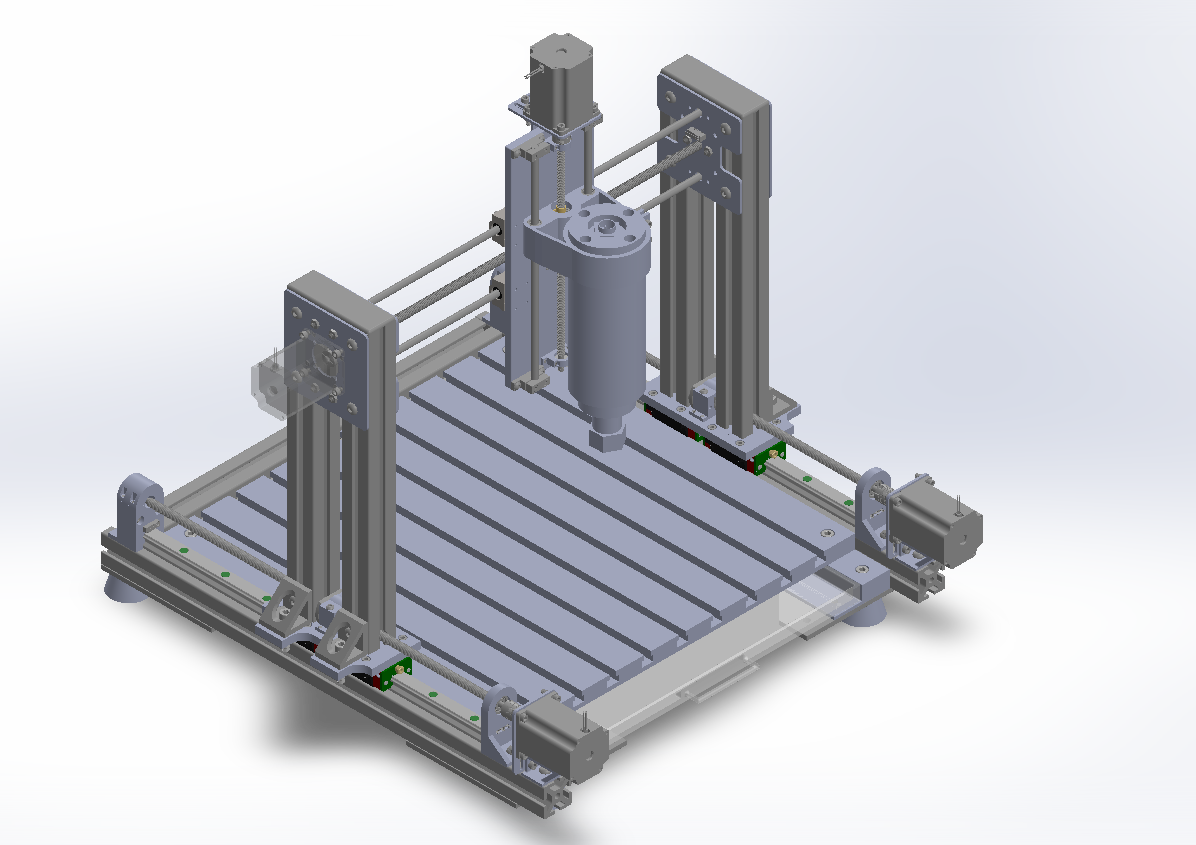
Here is our final CAD model! This took a lot of time, and it would have taken even longer if not for Harrison, Amen, and Rahima, so I am forever grateful for them! No matter how the report gets graded, I am so impressed by how our team managed to work around all the challenges that we faced to create this CNC machine. From brainstorming and research, to the final references, there was never a day without some troubleshooting, but finding the solutions to the problems at hand is what makes us engineers!
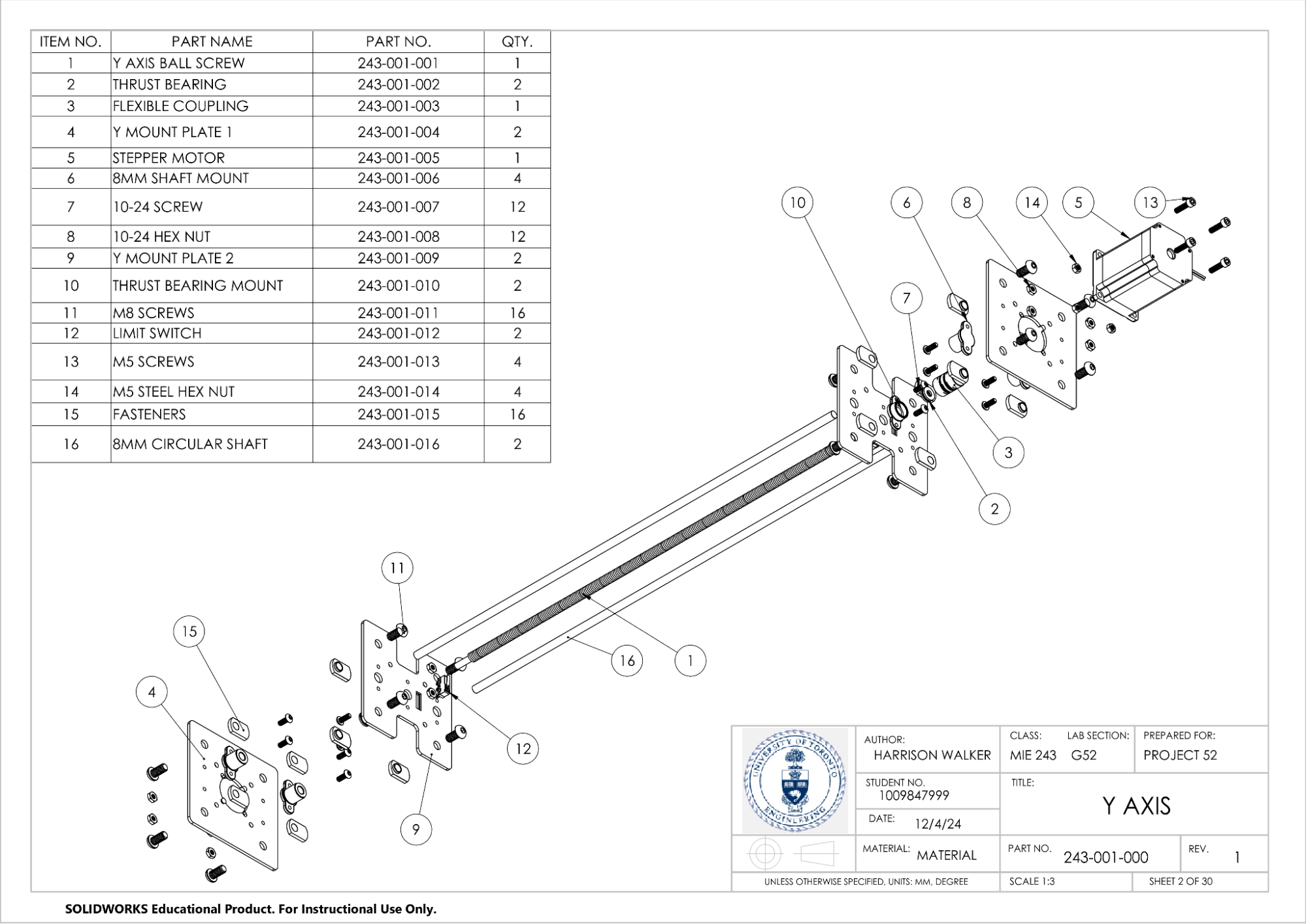
This image shows the subassembly for the y-axis in exploded view. Harrison worked on these exploded view drawings. A lot of the difficulty with the exploded view drawings is in the space allocated on the page. Fitting everything in nicely and making sure to label everything properly can be challenging, especially with the amount of parts in each subassembly. Add being on a university sleep schedule, and other assignments, and these drawings can become extremely challenging.
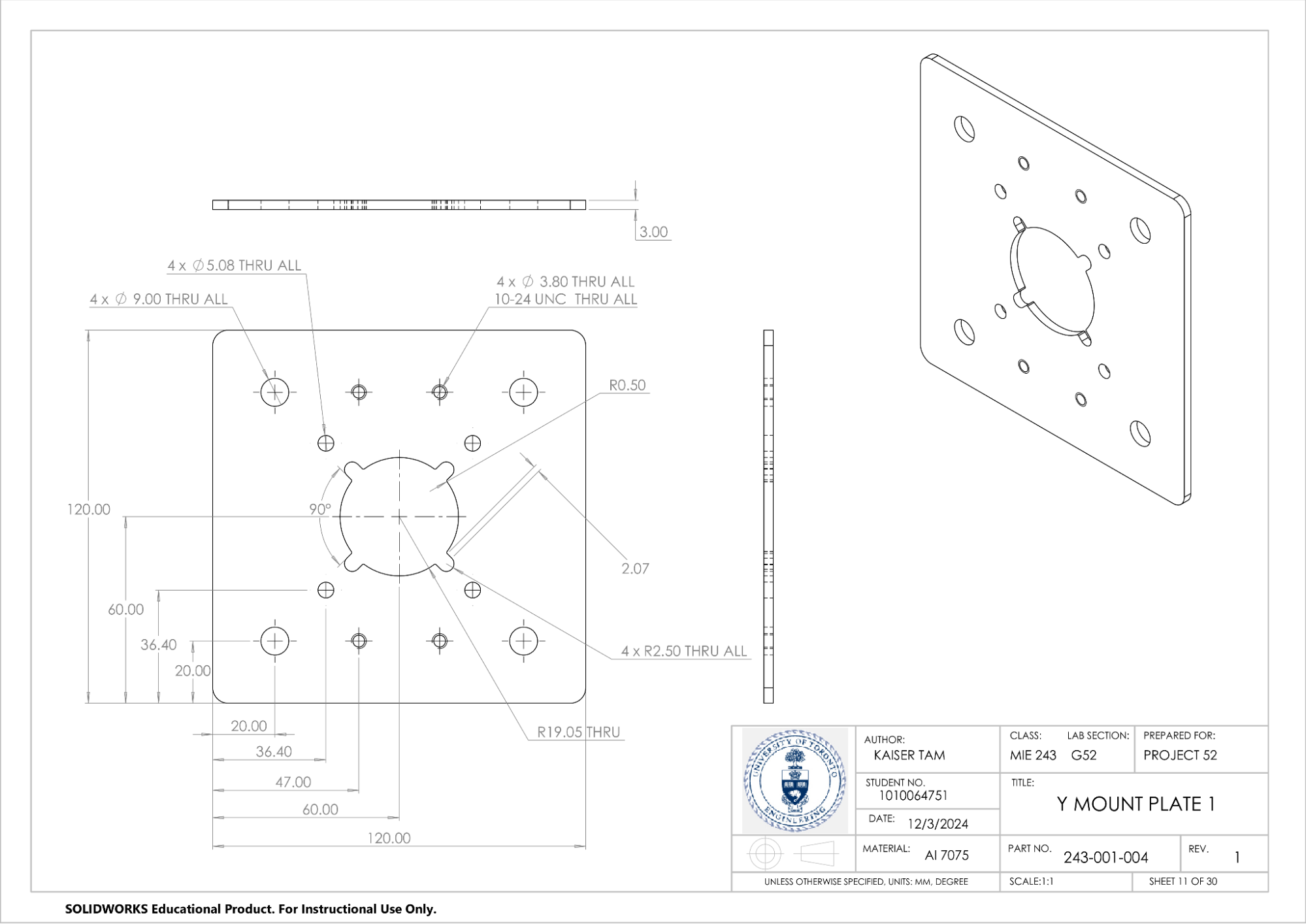
One of the custom mount plates for the y-axis. This drawing was alright to do, and I actually realized that there was a hole callout tool that allows the user to add hole callouts while making these drawings. The hole callout was incredibly useful and saved me a lot of time, especially since I had to do a lot of drawings for custom parts.

And so, that is our CNC project. For future MIE243 students, I hope that this CNC machine project page was insightful, and you are able to take something from it (not literally, that would be plagiarism, don’t do that), and I hope that you can make your project better than ours was, with the knowledge gained from this page. This project taught me a lot about Solidworks drawings and assembly, and about proper engineering documentation.